hanonymouss
Gebruiker
- Lid geworden
- 7 sep 2011
- Berichten
- 283
Hallo allemaal,
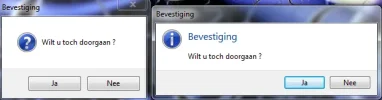
Ik heb een functie gevonden voor VB.net dat je taskdialog kunt gebruiken in de plaats van de klassieke messagebox.(Alleen voor Vista en 7) De code werkt uitstekend maar ik kan de taskdialog niet gebruiken zoals bij een messagebox om bijvoorbeeld gebruikers te laten kiezen tussen ja of nee. Dit kun je doen met messagebox maar taskdialog
Bij een messagebox werkt deze wel:
[CPP]dim info as MsgBoxResult
t = MessageBox.Show("Wilt u toch doorgaan ?", "Bevestiging", MessageBoxButtons.YesNo, MessageBoxIcon.Question)
If t = MsgBoxResult.Yes Then
label1.text = "U hebt voor JA gekozen"
ElseIf t = MsgBoxResult.No Then
label1.text = "U hebt voor Nee gekozen"
[/CPP]
Als ik dit doe voor de taskdialog werkt dit niet. Hier de volledige code:
[CPP]Imports System.Runtime.InteropServices
Public Class Form1
Dim t As TaskDialogResult
Private Sub Button1_Click(sender As System.Object, e As System.EventArgs) Handles Button1.Click
t = TaskDialog.Show(Me, "Wilt u toch doorgaan ?", "Bevestiging", "Bevestiging", TaskDialogButtons.Yes Or TaskDialogButtons.No, TaskDialogIcon.Question)
If t = TaskDialogResult.Yes Then
label1.text = "U hebt voor JA gekozen"
ElseIf t = TaskDialogResult.No Then
label1.text = "U hebt voor Nee gekozen"
End If
End Sub
End Class
Public Class TaskDialog
<DllImport("comctl32.dll", CharSet:=CharSet.Unicode, EntryPoint:="TaskDialog")> _
Private Shared Function _TaskDialog(hWndParent As IntPtr, hInstance As IntPtr, pszWindowTitle As [String], pszMainInstruction As [String], pszContent As [String], dwCommonButtons As Integer, _
pszIcon As IntPtr, pnButton As Integer) As Integer
End Function
Public Shared Function Show(owner As IWin32Window, text As String) As TaskDialogResult
Return Show(owner, text, Nothing, Nothing, TaskDialogButtons.OK)
End Function
Public Shared Function Show(owner As IWin32Window, text As String, instruction As String) As TaskDialogResult
Return Show(owner, text, instruction, Nothing, TaskDialogButtons.OK, 0)
End Function
Public Shared Function Show(owner As IWin32Window, text As String, instruction As String, caption As String) As TaskDialogResult
Return Show(owner, text, instruction, caption, TaskDialogButtons.OK, 0)
End Function
Public Shared Function Show(owner As IWin32Window, text As String, instruction As String, caption As String, buttons As TaskDialogButtons) As TaskDialogResult
Return Show(owner, text, instruction, caption, buttons, 0)
End Function
Public Shared Function Show(owner As IWin32Window, text As String, instruction As String, caption As String, buttons As TaskDialogButtons, icon As TaskDialogIcon) As TaskDialogResult
Return ShowInternal(owner.Handle, text, instruction, caption, buttons, icon)
End Function
Public Shared Function Show(text As String) As TaskDialogResult
Return Show(text, Nothing, Nothing, TaskDialogButtons.OK)
End Function
Public Shared Function Show(text As String, instruction As String) As TaskDialogResult
Return Show(text, instruction, Nothing, TaskDialogButtons.OK, 0)
End Function
Public Shared Function Show(text As String, instruction As String, caption As String) As TaskDialogResult
Return Show(text, instruction, caption, TaskDialogButtons.OK, 0)
End Function
Public Shared Function Show(text As String, instruction As String, caption As String, buttons As TaskDialogButtons) As TaskDialogResult
Return Show(text, instruction, caption, buttons, 0)
End Function
Public Shared Function Show(text As String, instruction As String, caption As String, buttons As TaskDialogButtons, icon As TaskDialogIcon) As TaskDialogResult
Return ShowInternal(IntPtr.Zero, text, instruction, caption, buttons, icon)
End Function
Private Shared Function ShowInternal(owner As IntPtr, text As String, instruction As String, caption As String, buttons As TaskDialogButtons, icon As TaskDialogIcon) As TaskDialogResult
Dim p As Integer
If _TaskDialog(owner, IntPtr.Zero, caption, instruction, text, CInt(buttons), _
New IntPtr(CInt(icon)), p) <> 0 Then
Throw New InvalidOperationException("Er is iets vreemds gebeurd")
End If
Select Case p
Case 1
Return TaskDialogResult.OK
Case 2
Return TaskDialogResult.Cancel
Case 4
Return TaskDialogResult.Retry
Case 6
Return TaskDialogResult.Yes
Case 7
Return TaskDialogResult.No
Case 8
Return TaskDialogResult.Close
Case Else
Return TaskDialogResult.None
End Select
End Function
End Class
<Flags()> _
Public Enum TaskDialogButtons
OK = &H1
Cancel = &H8
Yes = &H2
No = &H4
Retry = &H10
Close = &H20
End Enum
Public Enum TaskDialogIcon
Information = UInt16.MaxValue - 2
Warning = UInt16.MaxValue
[Stop] = UInt16.MaxValue - 1
Question = 0
SecurityWarning = UInt16.MaxValue - 5
SecurityError = UInt16.MaxValue - 6
SecuritySuccess = UInt16.MaxValue - 7
SecurityShield = UInt16.MaxValue - 3
SecurityShieldBlue = UInt16.MaxValue - 4
SecurityShieldGray = UInt16.MaxValue - 8
End Enum
Public Enum TaskDialogResult
None
OK
Cancel
Yes
No
Retry
Close
End Enum
[/CPP]
Graag jullie hulp
Ik heb een functie gevonden voor VB.net dat je taskdialog kunt gebruiken in de plaats van de klassieke messagebox.(Alleen voor Vista en 7) De code werkt uitstekend maar ik kan de taskdialog niet gebruiken zoals bij een messagebox om bijvoorbeeld gebruikers te laten kiezen tussen ja of nee. Dit kun je doen met messagebox maar taskdialog
Bij een messagebox werkt deze wel:
[CPP]dim info as MsgBoxResult
t = MessageBox.Show("Wilt u toch doorgaan ?", "Bevestiging", MessageBoxButtons.YesNo, MessageBoxIcon.Question)
If t = MsgBoxResult.Yes Then
label1.text = "U hebt voor JA gekozen"
ElseIf t = MsgBoxResult.No Then
label1.text = "U hebt voor Nee gekozen"
[/CPP]
Als ik dit doe voor de taskdialog werkt dit niet. Hier de volledige code:
[CPP]Imports System.Runtime.InteropServices
Public Class Form1
Dim t As TaskDialogResult
Private Sub Button1_Click(sender As System.Object, e As System.EventArgs) Handles Button1.Click
t = TaskDialog.Show(Me, "Wilt u toch doorgaan ?", "Bevestiging", "Bevestiging", TaskDialogButtons.Yes Or TaskDialogButtons.No, TaskDialogIcon.Question)
If t = TaskDialogResult.Yes Then
label1.text = "U hebt voor JA gekozen"
ElseIf t = TaskDialogResult.No Then
label1.text = "U hebt voor Nee gekozen"
End If
End Sub
End Class
Public Class TaskDialog
<DllImport("comctl32.dll", CharSet:=CharSet.Unicode, EntryPoint:="TaskDialog")> _
Private Shared Function _TaskDialog(hWndParent As IntPtr, hInstance As IntPtr, pszWindowTitle As [String], pszMainInstruction As [String], pszContent As [String], dwCommonButtons As Integer, _
pszIcon As IntPtr, pnButton As Integer) As Integer
End Function
Public Shared Function Show(owner As IWin32Window, text As String) As TaskDialogResult
Return Show(owner, text, Nothing, Nothing, TaskDialogButtons.OK)
End Function
Public Shared Function Show(owner As IWin32Window, text As String, instruction As String) As TaskDialogResult
Return Show(owner, text, instruction, Nothing, TaskDialogButtons.OK, 0)
End Function
Public Shared Function Show(owner As IWin32Window, text As String, instruction As String, caption As String) As TaskDialogResult
Return Show(owner, text, instruction, caption, TaskDialogButtons.OK, 0)
End Function
Public Shared Function Show(owner As IWin32Window, text As String, instruction As String, caption As String, buttons As TaskDialogButtons) As TaskDialogResult
Return Show(owner, text, instruction, caption, buttons, 0)
End Function
Public Shared Function Show(owner As IWin32Window, text As String, instruction As String, caption As String, buttons As TaskDialogButtons, icon As TaskDialogIcon) As TaskDialogResult
Return ShowInternal(owner.Handle, text, instruction, caption, buttons, icon)
End Function
Public Shared Function Show(text As String) As TaskDialogResult
Return Show(text, Nothing, Nothing, TaskDialogButtons.OK)
End Function
Public Shared Function Show(text As String, instruction As String) As TaskDialogResult
Return Show(text, instruction, Nothing, TaskDialogButtons.OK, 0)
End Function
Public Shared Function Show(text As String, instruction As String, caption As String) As TaskDialogResult
Return Show(text, instruction, caption, TaskDialogButtons.OK, 0)
End Function
Public Shared Function Show(text As String, instruction As String, caption As String, buttons As TaskDialogButtons) As TaskDialogResult
Return Show(text, instruction, caption, buttons, 0)
End Function
Public Shared Function Show(text As String, instruction As String, caption As String, buttons As TaskDialogButtons, icon As TaskDialogIcon) As TaskDialogResult
Return ShowInternal(IntPtr.Zero, text, instruction, caption, buttons, icon)
End Function
Private Shared Function ShowInternal(owner As IntPtr, text As String, instruction As String, caption As String, buttons As TaskDialogButtons, icon As TaskDialogIcon) As TaskDialogResult
Dim p As Integer
If _TaskDialog(owner, IntPtr.Zero, caption, instruction, text, CInt(buttons), _
New IntPtr(CInt(icon)), p) <> 0 Then
Throw New InvalidOperationException("Er is iets vreemds gebeurd")
End If
Select Case p
Case 1
Return TaskDialogResult.OK
Case 2
Return TaskDialogResult.Cancel
Case 4
Return TaskDialogResult.Retry
Case 6
Return TaskDialogResult.Yes
Case 7
Return TaskDialogResult.No
Case 8
Return TaskDialogResult.Close
Case Else
Return TaskDialogResult.None
End Select
End Function
End Class
<Flags()> _
Public Enum TaskDialogButtons
OK = &H1
Cancel = &H8
Yes = &H2
No = &H4
Retry = &H10
Close = &H20
End Enum
Public Enum TaskDialogIcon
Information = UInt16.MaxValue - 2
Warning = UInt16.MaxValue
[Stop] = UInt16.MaxValue - 1
Question = 0
SecurityWarning = UInt16.MaxValue - 5
SecurityError = UInt16.MaxValue - 6
SecuritySuccess = UInt16.MaxValue - 7
SecurityShield = UInt16.MaxValue - 3
SecurityShieldBlue = UInt16.MaxValue - 4
SecurityShieldGray = UInt16.MaxValue - 8
End Enum
Public Enum TaskDialogResult
None
OK
Cancel
Yes
No
Retry
Close
End Enum
[/CPP]
Graag jullie hulp