
Goedemiddag,
Ik ben met een macro bezig waarmee ik 2 sheets van mijn bestand kan mailen.
Dit werkt oke, alleen heb ik er 2 vraagjes over die iemand wellicht kan beantwoorden.
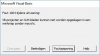
Wanneer ik de mail verstuur krijg ik een pop-up zie hieronder afb 1.

in deze pop-up kan ik op ja, nee of help drukken.
wanneer ik op ja druk opent hij outlook (zoals het hoort)
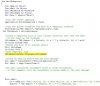
wanneer ik nee druk krijg ik een error zie afb 2
Wanneer ik hier op foutopsporing druk krijg ik een gele balk in mijn code zie afb 3.
Ik heb geprobeert "On Error GoTo GetOut" toe te voegen en GetOut onder Kill LWorkbook.FullName te plaatsen, dan komt de error bij Nee niet meer, maar dan opent hij outlook bij Ja ook niet meer. wie o wie heeft de oplossing?
Adile
Ik ben met een macro bezig waarmee ik 2 sheets van mijn bestand kan mailen.
Dit werkt oke, alleen heb ik er 2 vraagjes over die iemand wellicht kan beantwoorden.
Wanneer ik de mail verstuur krijg ik een pop-up zie hieronder afb 1.
in deze pop-up kan ik op ja, nee of help drukken.
wanneer ik op ja druk opent hij outlook (zoals het hoort)
wanneer ik nee druk krijg ik een error zie afb 2
Wanneer ik hier op foutopsporing druk krijg ik een gele balk in mijn code zie afb 3.
Ik heb geprobeert "On Error GoTo GetOut" toe te voegen en GetOut onder Kill LWorkbook.FullName te plaatsen, dan komt de error bij Nee niet meer, maar dan opent hij outlook bij Ja ook niet meer. wie o wie heeft de oplossing?
Code:
Sub MailErReport()

   Dim oApp As Object
   Dim oMail As Object
   Dim LWorkbook As Workbook
   Dim LFileName As String
   Set Data = Sheets("Data")

   'Turn off screen updating
   Application.ScreenUpdating = False

   'Copy the active worksheet and save to a temporary workbook
   Sheets(Array("ER Report", "Afhandeling")).Copy
 Set LWorkbook = ActiveWorkbook

   'Create a temporary file in your current directory that uses the name
   ' of the sheet as the filename
   LFileName = "ER Report " & Cells(2, 8) & " " & Cells(22, 21) & ".xls"
   On Error Resume Next
   'Delete the file if it already exists
   Kill LFileName
   On Error GoTo 0
   'Save temporary file
   LWorkbook.SaveAs Filename:=LFileName

   'Create an Outlook object and new mail message
   Set oApp = CreateObject("Outlook.Application")
   Set oMail = oApp.CreateItem(0)

   'Set mail attributes (uncomment lines to enter attributes)
   ' In this example, only the attachment is being added to the mail message


   With oMail
      .to = "A@b.nl" 'Data.Cells(2, 42) & Data.Cells(3, 42) & Data.Cells(4, 42) & Data.Cells(5, 42) & Data.Cells(6, 42) & Data.Cells(7, 42) & Data.Cells(8, 42) & Data.Cells(9, 42) & Data.Cells(10, 42) & Data.Cells(11, 42) & Data.Cells(12, 42) & Data.Cells(13, 42)
      .Subject = "ER Report " & Cells(2, 8) & " " & Cells(22, 21)

      .HTMLBody = "<font Face = ""Arial"">" & Data.Cells(1, 24) & "</font><br><br>"


      .Attachments.Add LWorkbook.FullName
      .Display
   End With

   'Delete the temporary file and close temporary Workbook
   LWorkbook.ChangeFileAccess Mode:=xlReadOnly
   Kill LWorkbook.FullName
   LWorkbook.Close savechanges:=False

   'Turn back on screen updating
   Application.ScreenUpdating = True
   Set oMail = Nothing
   Set oApp = Nothing

End Sub
Adile

 :thumb:

