outlook werkt niet na update windows 10

Status
Niet open voor verdere reacties.

tjima

Gebruiker
Lid geworden
17 dec 2001
Berichten
860
Hallo

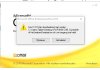
vandaag een update van windows 10 gedaan . maar na die update werk mijn outlook niet meer . krijg ik de melding Fout 1311. kan bronbestand niet vinden :
ProPr.cab . wat gaat hier niet goed ??

tjima ScreenHunter_348 Dec. 19 14.28.jpg
 
Laatst bewerkt:
Bekend issue! Enigste oplossing: Outlook opnieuw installeren!
 
Hallo PHP4U
ik heb geprobeerd het te herstellen maar dat werkt ook niet .
wanneer ik het opnieuw installeert moet ik zeker eerst verwijderen. en wanneer ik het opnieuw heb geinstalleer krijg ik dan mijn contacten er de vorige verzonden en ontvangen mail dan ook weer terug ??

tjima
 
Geen idee, maar het is aan te raden om deze veilig te stellen.
 
Hallo. Heb je nog een oude office erop staan? Die moet je eerst verwijderen. Die .cab is mogelijkerwijs een verwijzing naar oude office.
 
Laatst bewerkt:
Workarpound die hier lijkt te werken:
https://social.technet.microsoft.co...wpropsww2cab-on-office-2013?forum=officeitpro
Question
Finally understood your simple solution.
The installer is asking for the Location\parent folder for the Folder "ProPlus.WW" and NOT for the location\parent folder to the file "propsww2.cab"


Thanks The_SLX
YESSSS! It worked.
Just use (as an example)..
C:\YourInstallFolder\Office 2013 Professional Plus x64
(copy and paste path from Windows Explorer to the text box on the error dialog).
Also, if ProPsWW2.cab is actually missing (which, in my case was missing), you will have to get it from the install CD (no, the installation does not copy this file intact; it is a cabinet file and all files are extracted from it during installation).
April-2016

en onderaan
YESSSS, write it WITHOUT "ProPlus.WW" AND ADD "" !!!!!!
 
fout is opgelost ????
hoe weet ik niet het doet het ineens weer prima .
alleen is mijn PC trager geworden ? bij spelletjes .

Tjima
 
Status
Niet open voor verdere reacties.
Terug
Bovenaan Onderaan