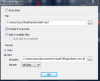
Virtual DJ en microfoon.

Status
Niet open voor verdere reacties.

Vliegtuigfan

Gebruiker
Lid geworden
21 feb 2011
Berichten
625
Goedendag.

Sinds een lange tijd ben ik begonnen met een radio via internet.
Dit liep niet zo best, ik werd gek van het programma. Ik moest steeds de microfoon voor de boxen houden. Dat wou ik echt niet meer:confused:

Dus...
Er ging ongeveer een week overheen... En toen kwam ik uit bij Atomix Virtual DJ pro 7.0

Ik dacht Dat moet ik hebben!!:thumb:
Hij was erg prijzig. Dus ik moest lang sparen.

Een paar weken later... Kom ik hem kopen. En dat ging met succes. Het programma werkt uitstekend. Het draaien van mijn radio gaat prima.:thumb:

Maar!! Mijn vraag is: Hoe sluit ik mijn microfoon aan op virtual DJ.
Ik heb het geprobeert, maar kwam niet verder dan dit:Virtual DJ microfoon.PNG
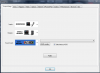
Hij herkent de microfoon niet. Ik dacht: het licht vast aan de microfoon.
Ik koop gewoon een leuke headset.
Dus, ik rennen naar de hema. En koop een headset van 10,00 euro.:P

Dus ik kom thuis. En hij doet het niet. whats happen

Help me!!;)
 
staan je config settings wel goed,daar moet je je microfoon ook nog instellen,btw is die virtual dj pro 7.0 maar 30 euro en dat is eigenlijk gewoon een spot prijs :P
 
welke geluidskaart gebruik je hiervoor?
is de microphone/headset met een usb of jack aansluiting?


1
Connect your microphone to your computer using the appropriate connector. Most microphones use either 3.5 mm connectors or USB.
2
Launch Virtual DJ from your computer's "Start" menu.
3
Click the "Record" tab at the top of the window. Click the "Record Audio" button on the left side of the window. Click the "Config" button.
4
Select the "Master + MIC" radio button and click "OK." VirtualDJ will now record the output from your microphone into your mix
.
 
welke geluidskaart gebruik je hiervoor?
is de microphone/headset met een usb of jack aansluiting?


1
Connect your microphone to your computer using the appropriate connector. Most microphones use either 3.5 mm connectors or USB.
2
Launch Virtual DJ from your computer's "Start" menu.
3
Click the "Record" tab at the top of the window. Click the "Record Audio" button on the left side of the window. Click the "Config" button.
4
Select the "Master + MIC" radio button and click "OK." VirtualDJ will now record the output from your microphone into your mix
.

Snap ik. Maar ehh... het staat er niet bij: kijk maar:Knipsel2.PNG

@basiboy: Wat moet ik dan goed instellen??
p.s. Het kost: (zie bijlage)
 

Bijlagen

  • Knipsel.PNG
    Knipsel.PNG
    15,7 KB · Weergaven: 107
Laatst bewerkt:
je moet dit hebben:
setup.jpg


krijg de indruk dat het in de verschillende skins anders word weergegeven,kies eens tijdelijk een andere skin en kijk of het verschil maakt.
 
Het lukt me niet. Welke skin ik ook probeer.... Welke versie heb je van ATOMIX virtual DJ dan?

p.s. welke skin gebruik jij dan?
 
weet niet precies....zit nu op mijn werk volgens mij heb ik v-dj6.xx

ik zal vanavond ff kijken hoe of wat....
 
heb 't ff nagekeken,het schijnt in Vdj 7 allemaal anders te zijn opgesteld in de configuratie....

ga naar sound setup,
kies in "outputs" "advanced config"
klik op de button "advanced config" naast outputs
daar kan je kiezen voor microphone


to record mic or line in, choose ADVANCED SOUND CONFIG, in the 2nd drop down in souncard settings.

Then set your deck outputs, and last add RECORD LOOPBACK, with mic or line in input

Thats it ;)

Reason it has changed is that MIC and LINE IN is a new features of VDJ 7, where one can play live sources directly on a deck, and mix it (apply effects, read the bpm, remix), and record from sources on the fly to a deck (e.g scratch a vocal sample
)

bron
 
heb 't ff nagekeken,het schijnt in Vdj 7 allemaal anders te zijn opgesteld in de configuratie....

ga naar sound setup,
kies in "outputs" "advanced config"
klik op de button "advanced config" naast outputs
daar kan je kiezen voor microphone


to record mic or line in, choose ADVANCED SOUND CONFIG, in the 2nd drop down in souncard settings.

Then set your deck outputs, and last add RECORD LOOPBACK, with mic or line in input

Thats it ;)

Reason it has changed is that MIC and LINE IN is a new features of VDJ 7, where one can play live sources directly on a deck, and mix it (apply effects, read the bpm, remix), and record from sources on the fly to a deck (e.g scratch a vocal sample
)

bron

He! Dankje :) het werkt!! :thumb:
 
Status
Niet open voor verdere reacties.
Terug
Bovenaan Onderaan