wizard nieuwe verbinding werkt niet

Status
Niet open voor verdere reacties.

army of renault

Gebruiker
Lid geworden
16 dec 2003
Berichten
212
ik heb samen met een vriend geprobeert een netwerk tussne onze 2 computers te maken via internet.

nu hbbn we alebij dit gedaan:
http://www.kovoks.nl/index.phtml?ta...search?hl=nl&q=vpn+verbinding&meta=lr=lang_nl

maar we krijgen een fout 800

hij heb mij ip ingetikt en ik zijn
alebij zelfde bedrijfsnaam

en dan mmeot je in logguh ik hat daar wel wat anders dan hem maar dat lijtk me normaal?
doen wij wat fout of werkt dit zo niet?

zo niet is er dan een andere iets dat we een netwerk via internet naar elkaar kunnuh maken?

mvg melvin
 
altijd problemen met netwerk koop gewoon een router (wel de boekje bewaren)
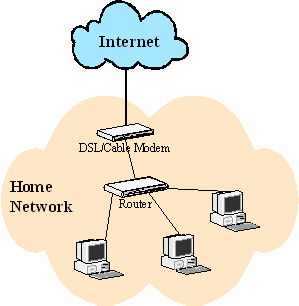
snmp-wan-router.gif

op deze afbeelding zie je 3 computers het kunnen er 2 zijn of 4 maakt niet uit dan is het al gauw opgelost:thumb: :thumb:
 
Laatst bewerkt:
Ik heb weinig verstand van dit soort verbindingen, maar kan het misschien zijn dat jullie allebei proberen client-side te gaan?

Moet er niet 1 van de 2 een 'host' programmatje hebben ofzo?
 
@StoneyCity het gaat over een netwerkverbinding via internet.... Dit wil met een router niet gaan denk ik :) of je moet wel heeeele lange kabels hebben :)
 
en router heb ik al maar dat is alleen thuis hijw oont 5km van em af
dus dat is het probleem:confused:

drrm via internet een netwerk proberen
 
Ja leuk

Ben bang dat de PC's niet in de zelfde woning staan.

Dus moet het via VPN, dat doen ze goed.

Helaas niet helder wat je fout doet.

Eric.:thumb:
 
Army of Renault wat krijg je precies voor foutmeldingen dan? Iets met de beveiligingcode?
 
Vpn

Herkent de tegen partij via IP adres, maar of XP een standaard VPN host heeft zou ik niet weten.

Eric.
 
Ik denk dat je dit nodig hebt:

How to configure Win 2000/XP Pro as VPN host
Prior to Windows 2000/XP Pro, you must add PPTP on NT 4.0 Server to establish VPN connections. With the release of Windows 2000/XP Pro, you have the ability to run a Windows 2000/XP Pro as a VPN host. However, Windows 2000/XP Pro enables only one VPN connection at a time and requires Internet Protocol (IP).

Before you start the VPN configuration, you should have a equipment (modem, T1, Frame Relay, ADSL, or cable modem) connecting to the Internet. Also make sure you have correct TCP/IP settings on the W2K/XP.

To setup Win XP (in our case) Pro as VPN host, go to the Properties of My Network Places>Create a New Connections>Set up a Advanced Connection>Accept Incoming Connections. On the Devices for Incoming Connections dialog box, do not select any device, only click Next and check Allow Private Connections, and then click Next. On the Allowed Users dialog box, select or add all users for whom you want to enable access. The accounts have to exist on both computers that are involved in establishing the VPN connection. On the New Connection Wizard, File and Printer Sharing for Microsoft Networks, Internet Protocol (TCP/IP) and Client for Microsoft Networks should be listed as networking components. By default, Allow callers to access my local area network and Assign TCP/IP address automatically using DHCP are checked. If you would like to keep the default settings, click Next to continue. Now, the Incoming Connection icon should show on Incoming section under the Properties of My Network Places and is ready to use.
 
Klopt dus

De server zal je eerst moeten maken. Dus er is geen host.

Het leek me ook al bizar dat je elkaar zowel als client als als host kon beschouwen.
 
Ik heb hier een testserver open staan renault dus laat maar weten of je wilt testen? ik kan je geen prive bericht sturen met gegevens, ben geen lid :)
 
Ok

Maar het blijft een richtings verkeer. (denk ik)

En Grouper is twee richtings verkeer.

Eric.
 
Laatst bewerkt:
en jah de zeflde windows zelfs de zelde cd:P sorry voor het illigalen
 
Laatst bewerkt:
wat is grouper dan?

kijk mijn bedoeling is dat we in ierdergeval een netwerk hebben of computers in contact staan met elkaar
 
Het kan natuurlijk ook nog zo zijn dat routers/firewalls het blokkeren...
 
Status
Niet open voor verdere reacties.
Terug
Bovenaan Onderaan