Sabphi
Gebruiker
- Lid geworden
- 29 aug 2012
- Berichten
- 21
- Besturingssysteem
- Windows 11
- Office versie
- Office 2021
Hallo,
Eerst had ik deze gemaakt om naar een PDF af te drukken wat lukte. Nu wil ik de PDF file verzenden via mail ook. Dit lukt tot heden niet.
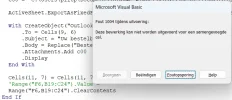
Alles werkt tot ik de .Attachments.Add PDFNaam aan zet. Dan zie ik dat hij het bestand niet vind terwijl hij op mijn PC Staat.
Vergeet ik iets
Ik gebruik hiervoor Excel van Office 2021 onder windows 11.
Eerst had ik deze gemaakt om naar een PDF af te drukken wat lukte. Nu wil ik de PDF file verzenden via mail ook. Dit lukt tot heden niet.
Alles werkt tot ik de .Attachments.Add PDFNaam aan zet. Dan zie ik dat hij het bestand niet vind terwijl hij op mijn PC Staat.
Vergeet ik iets
Ik gebruik hiervoor Excel van Office 2021 onder windows 11.
Code:
Private Sub CMD_Print_Click()
    Dim naam As String
    Dim Nummer As String
    Dim Antwoord As String
    Dim OutApp As Object
    Dim OutMail As Object
    Dim PDFNaam As String
    Dim strbody As String

    If Worksheets("Bestelbon").Range("F6").Value = "" Then GoTo Melding

    naam = Worksheets("Bestelbon").Range("F6").Value
    Nummer = Worksheets("Bestelbon").Range("G11").Value
    PDFNaam = "C:\Users\plltp\Documents\Blauwe Wimpel\Kledij\Bestellingen\2027\" & Nummer & " " & naam


    ' Exporteer naar PDF
    ActiveSheet.ExportAsFixedFormat Type:=xlTypePDF, _
        Filename:="C:\Users\plltp\Documents\Blauwe Wimpel\Kledij\Bestellingen\2027\" & Nummer & " " & naam, _
        Quality:=xlQualityStandard, _
        IncludeDocProperties:=True, _
        IgnorePrintAreas:=False, _
        OpenAfterPublish:=False 'Zet op True om de PDF direct te openen, False indien niet openen

        Set OutApp = CreateObject("Outlook.Application")
        Set OutMail = OutApp.CreateItem(0)

            strbody = "Beste" & vbNewLine & vbNewLine & _
              "Uw bestelbon vind u terug in de bijlage " & Nummer & " " & naam & vbNewLine & _
              " " & vbNewLine & _
              "Met vriendelijke groet" & vbNewLine & _
              "Het bestuur"

            With OutMail
                .To = Range("F9")
                .CC = ""
                .BCC = ""
                .Subject = "Uw bestelbon"
                .Body = strbody
                '.Attachments.Add PDFNaam
                .Display 'Of gebruik .Send om direct te verzenden
            End With

    Set OutMail = Nothing
    Set OutApp = Nothing

    Worksheets("Bestelbon").Range("G11").Value = Worksheets("Bestelbon").Range("G11") + 1
    Worksheets("Bestelbon").Range("F6").Value = ""
    Worksheets("Bestelbon").Range("B19:C24") = ""

    GoTo Einde

Melding:
        Antwoord = MsgBox("Er is geen lid geselecteerd", vbvbCritical, "FOUT")
Einde:
End Sub