
Installeer de app
Hoe de app op iOS te installeren
Bekijk de onderstaande video om te zien hoe je onze site als een web app op je startscherm installeert.
Opmerking: Deze functie is mogelijk niet beschikbaar in sommige browsers.
Je gebruikt een verouderde webbrowser. Het kan mogelijk deze of andere websites niet correct weergeven.
Het is raadzaam om je webbrowser te upgraden of een browser zoals Microsoft Edge of Google Chrome te gebruiken.
Het is raadzaam om je webbrowser te upgraden of een browser zoals Microsoft Edge of Google Chrome te gebruiken.
Opgelost Gegevens overzetten van een excel-file naar een excel-file
- Onderwerp starter DutchOirs
- Startdatum
Dit topic is als opgelost gemarkeerd


edmoor
Inventaris
- Lid geworden
- 8 sep 2000
- Berichten
- 43.358
- Besturingssysteem
- Windows 98SE, XP, 7, 10 LTSC, 11-26H2, Zorin OS 18.1
- Office versie
- Office 2021
Ja, dat kan. Maar handig is anders vind ik.
AI zegt er dit over:
Het automatisch bewerken van VBA-macro's met behulp van een andere macro (ook wel VBA-code wijzigen via code, ofwel 'metaprogrammering') is mogelijk via de VBProject eigenschap. Met specifieke code kun je modules uitlezen, tekst aanpassen, toevoegen of verwijderen.
Toegang verlenen tot het VBA-project
Voordat je met VBA code in VBA-code kunt zoeken of deze kunt manipuleren, moet Excel dit toestaan. Dit is een strenge veiligheidsmaatregel:
Om code in een module (bijvoorbeeld Module1) te bewerken, kun je gebruikmaken van de VBComponents bibliotheek. Hieronder staan de specifieke codeblokken voor de meest uitgevoerde acties:
Zie ook de website van snb:
 www.snb-vba.eu
AI zegt er dit over:
Het automatisch bewerken van VBA-macro's met behulp van een andere macro (ook wel VBA-code wijzigen via code, ofwel 'metaprogrammering') is mogelijk via de VBProject eigenschap. Met specifieke code kun je modules uitlezen, tekst aanpassen, toevoegen of verwijderen.
Toegang verlenen tot het VBA-project
Voordat je met VBA code in VBA-code kunt zoeken of deze kunt manipuleren, moet Excel dit toestaan. Dit is een strenge veiligheidsmaatregel:
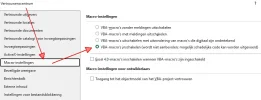
- Ga in Excel naar Bestand > Opties > Vertrouwenscentrum.
- Klik op Instellingen voor het Vertrouwenscentrum.
- Ga naar Macro-instellingen en vink de optie Toegang tot het objectmodel van VBA-projecten vertrouwen aan.
Om code in een module (bijvoorbeeld Module1) te bewerken, kun je gebruikmaken van de VBComponents bibliotheek. Hieronder staan de specifieke codeblokken voor de meest uitgevoerde acties:
Zie ook de website van snb:
VBA voor smarties: VBA-objecten met VBA-code maken/wijzigen
Laatst bewerkt:


peter59
Terugkerende gebruiker
- Lid geworden
- 21 mei 2007
- Berichten
- 3.326
- Besturingssysteem
- Windows 11
- Office versie
- Office 365
En zo denkt Claude erover.
In VBA kun je via code een module kopiëren naar een ander werkboek. Je hebt daar de VBA Extensibility Library voor nodig.
Eerst inschakelen:
Excel → Extra → Verwijzingen → vink aan: Microsoft Visual Basic for Applications Extensibility 5.3
Drie scenario's mogelijk:
Belangrijk: het doel-bestand moet een .xlsm zijn (macro-enabled), anders kan hij geen modules bevatten.
Nu maar eens afwachten waar @snb mee op de proppen komt.
In VBA kun je via code een module kopiëren naar een ander werkboek. Je hebt daar de VBA Extensibility Library voor nodig.
Eerst inschakelen:
Excel → Extra → Verwijzingen → vink aan: Microsoft Visual Basic for Applications Extensibility 5.3
Code:
Sub KopieerModuleNaarAnderFile()

    Dim wbBron   As Workbook
    Dim wbDoel   As Workbook
    Dim modulNaam As String
    Dim exportPad As String
    Dim comp      As VBIDE.VBComponent

    ' === Aanpassen ===
    modulNaam = "Module1"           ' Naam van de module die je wilt kopiëren
    exportPad = "C:\Temp\temp_module.bas"  ' Tijdelijk exportpad

    Set wbBron = ThisWorkbook       ' Werkboek MET de nieuwe macro
    Set wbDoel = Workbooks("DoelFile.xlsm")  ' Werkboek dat geüpdatet moet worden

    ' --- Stap 1: Exporteer module uit bronbestand ---
    On Error GoTo FoutAfhandeling
    wbBron.VBProject.VBComponents(modulNaam).Export exportPad

    ' --- Stap 2: Verwijder oude module in doelbestand (als die bestaat) ---
    On Error Resume Next
    Set comp = wbDoel.VBProject.VBComponents(modulNaam)
    If Not comp Is Nothing Then
        wbDoel.VBProject.VBComponents.Remove comp
    End If
    On Error GoTo FoutAfhandeling

    ' --- Stap 3: Importeer module in doelbestand ---
    wbDoel.VBProject.VBComponents.Import exportPad

    ' --- Stap 4: Tijdelijk bestand opruimen ---
    Kill exportPad

    MsgBox "Module '" & modulNaam & "' succesvol overgezet naar " & wbDoel.Name, vbInformation
    Exit Sub

FoutAfhandeling:
    MsgBox "Fout " & Err.Number & ": " & Err.Description, vbCritical

End Sub
Drie scenario's mogelijk:
| Scenario | Wat aanpassen |
|---|---|
| Doel-file is al open | Workbooks("DoelFile.xlsm") — gewoon de naam |
| Doel-file moet nog geopend worden | Set wbDoel = Workbooks.Open("C:\pad\DoelFile.xlsm") |
| Meerdere modules tegelijk | Loop over een Array("Module1", "Module2", ...) |
Belangrijk: het doel-bestand moet een .xlsm zijn (macro-enabled), anders kan hij geen modules bevatten.
Nu maar eens afwachten waar @snb mee op de proppen komt.
edmoor
Inventaris
- Lid geworden
- 8 sep 2000
- Berichten
- 43.358
- Besturingssysteem
- Windows 98SE, XP, 7, 10 LTSC, 11-26H2, Zorin OS 18.1
- Office versie
- Office 2021
Dat kan alleen op de PC waar het te bewerken document staat.
Uiteraard kan je ook via Remote Desktop werken.
In een bedrijfsomgeving is de kans erg groot dat de benodigde beveiliging instelling niet ingeschakeld mag worden.
Uiteraard kan je ook via Remote Desktop werken.
In een bedrijfsomgeving is de kans erg groot dat de benodigde beveiliging instelling niet ingeschakeld mag worden.
peter59
Terugkerende gebruiker
- Lid geworden
- 21 mei 2007
- Berichten
- 3.326
- Besturingssysteem
- Windows 11
- Office versie
- Office 365
Hier heeft Claude ook weer een antwoord op. Maar of het allemaal klopt??
Het probleem: Trust Center
Excel blokkeert standaard toegang tot het VBA-project via code. Dit moet op elke pc apart worden ingesteld:
Excel → Bestand → Opties → Vertrouwenscentrum → Instellingen Vertrouwenscentrum → Macro-instellingen → vink aan:
"Toegang tot het VBA-projectobjectmodel vertrouwen"
Zonder die vinkje krijg je de fout:
Programmatische toegang tot Visual Basic Project is niet vertrouwd
Alternatieven die wél vanaf een andere pc werken:
Optie A : Gewoon de .bas file meesturen
Optie B : Persoonlijke Werkmap (Personal.xlsb)
Macro's die je in Personal.xlsb zet zijn beschikbaar in alle Excel-bestanden op die pc.
Optie C : Add-in (.xlam)
- Macro's in een .xlam bestand zetten
- Eenmalig installeren via Excel → Invoegtoepassingen
- Daarna beschikbaar op die pc in elk werkboek
Samengevat :
Claude schrijft ook nog :
Voor jouw situatie zou ik Optie A aanraden het simpelst en werkt altijd.
Het probleem: Trust Center
Excel blokkeert standaard toegang tot het VBA-project via code. Dit moet op elke pc apart worden ingesteld:
Excel → Bestand → Opties → Vertrouwenscentrum → Instellingen Vertrouwenscentrum → Macro-instellingen → vink aan:
"Toegang tot het VBA-projectobjectmodel vertrouwen"
Zonder die vinkje krijg je de fout:
Programmatische toegang tot Visual Basic Project is niet vertrouwd
Alternatieven die wél vanaf een andere pc werken:
Optie A : Gewoon de .bas file meesturen
Code:
Geen code nodig!
- Exporteer de module handmatig (VBA Editor → rechtermuisklik → Exporteren)
- Stuur het .bas bestandje op
- Ontvanger importeert het zelf (rechtermuisklik → Importeren)
Optie B : Persoonlijke Werkmap (Personal.xlsb)
Macro's die je in Personal.xlsb zet zijn beschikbaar in alle Excel-bestanden op die pc.
Optie C : Add-in (.xlam)
- Macro's in een .xlam bestand zetten
- Eenmalig installeren via Excel → Invoegtoepassingen
- Daarna beschikbaar op die pc in elk werkboek
Samengevat :
| Methode | Andere pc | Instelling nodig |
|---|---|---|
| VBA Extensibility (code) |  Alleen met Trust Center aan Alleen met Trust Center aan | Ja, per pc |
| .bas exporteren/importeren |  Altijd Altijd | Nee |
| Personal.xlsb | Per pc installeren | Nee |
| Add-in .xlam | Makkelijkst te delen | Nee |
Claude schrijft ook nog :
Voor jouw situatie zou ik Optie A aanraden het simpelst en werkt altijd.
peter59
Terugkerende gebruiker
- Lid geworden
- 21 mei 2007
- Berichten
- 3.326
- Besturingssysteem
- Windows 11
- Office versie
- Office 365
Dat schreef Claude ook."Toegang tot het VBA-projectobjectmodel vertrouwen"
Zonder die vinkje krijg je de fout:
Programmatische toegang tot Visual Basic Project is niet vertrouwd
Goedemorgen allen,
Loop toch nog tegen een klein probleempje op met het overzetten
Alles werkt goed met overzetten maar het volgende kom ik tegen
Bij het overzetten van een getal met 4 cijfers achter de komma, rond hij deze af op 2 cijfers achter de komma.
Kan dus niet want dan lopen de berekeningen niet meer goed.
Hieronder het stukje macro:
Denk dat er een array aangepast moet worden, gaat namelijk om 2 kolommen.
Zou ik dan voor een array CDbl moeten zetten bv. Array H6:H41"
Iemand een idee? Thanks already
Dutch
Loop toch nog tegen een klein probleempje op met het overzetten
Alles werkt goed met overzetten maar het volgende kom ik tegen
Bij het overzetten van een getal met 4 cijfers achter de komma, rond hij deze af op 2 cijfers achter de komma.
Kan dus niet want dan lopen de berekeningen niet meer goed.
Hieronder het stukje macro:
Code:
'# HIERONDER DATA OVERZETTEN ##############################################################################
  Dim bronPad As String, bronBestand As String, wbBron As Workbook, wbDoel As Workbook
  Dim wsBron As Worksheet, wsDoel As Worksheet, blok As Variant, e As Long, j As Long, bladNaam As String, bereik As String

  '===Pas bestandslocatie aan===
  bronPad = ActiveWorkbook.Worksheets("Control").Range("D3")
  bronBestand = VolOldNaamTB & ".xls "

  If Dir(bronPad & bronBestand) = "" Then
    MsgBox "BronBestand bestaat niet: " & bronPad & bronBestand, vbCritical
    Exit Sub
  End If
  Set wbDoel = ThisWorkbook                                             ' Doel = huidig Bestand
  Set wbBron = Workbooks.Open(bronPad & bronBestand, ReadOnly:=True)    ' Bronbestand openen

'===Lijst met: Array's in Bronblad, Bronbereik, Doelblad, Doelbereik===
  blok = Array( _
  Array("Blad1", "A6:E41", "H6:L41", "O6:Q41", "A44", "I44", "A45:E83", "H45:L83", "O45:Q83", "S6:S41", "S45:S83", "W3:Y14", "AA3:AA14", "AD33", "AI3:AP60", "AI63", "AI64:AP122", "AQ3:AQ122", "AR3:AR122"), _
  Array("Kasboek", "A3:G60", "A63", "A64:G121"), _
  Array("Control", "L22", "L26", "L30", "E28", "I14", "L22", "L26", "L30"), _
  Array("Data", "A2:A60", "C2:C60") _
  )
  Application.ScreenUpdating = False
  Application.DisplayAlerts = False
  ' ===LOOP OVER BLOKKEN===
    For e = LBound(blok) To UBound(blok)    ' Range proberen te laden
      bladNaam = blok(e)(0)                 ' eerste element = werkbladnaam
      On Error Resume Next

      '===Blad ophalenuit Bron en Doel===
      Set wsBron = wbBron.Sheets(bladNaam)
      Set wsDoel = wbDoel.Sheets(bladNaam)
      On Error GoTo FoutAfhandeling
      If wsBron Is Nothing Or wsDoel Is Nothing Then
        MsgBox "Blad '" & bladNaam & "  ' niet gevondenin bron of doel.", vbExclamation
        Set wsBron = Nothing
        Set wsDoel = Nothing
        GoTo VolgendeBlok
      End If
      wsDoel.Unprotect
      For j = 1 To UBound(blok(e))          'Loop over bereiken(vanaf index1, want 0 = bladnaam
        bereik = blok(e)(j)
        On Error Resume Next

        wsDoel.Range(bereik).Value = wsBron.Range(bereik).Value

        If Err.Number <> 0 Then
          MsgBox "Fout bij bereik '" & bereik & "' op blad '" & bladNaam & "': " & Err.Description, vbExclamation
          Err.Clear
        End If
        On Error GoTo FoutAfhandeling
      Next j
      wsDoel.Protect
VolgendeBlok:
      Set wsBron = Nothing
      Set wsDoel = Nothing
    Next e
  '===Bronbestand sluiten===
  wbBron.Close SaveChanges:=False

  Application.ScreenUpdating = True
  Application.DisplayAlerts = True

########################################################################
Denk dat er een array aangepast moet worden, gaat namelijk om 2 kolommen.
Zou ik dan voor een array CDbl moeten zetten bv. Array H6:H41"
Code:
Array("Blad1", "A6:E41", CDbl("H6HL41"), "O6:Q41", "A44", "I44", "A45:E83", "H45:L83", "O45:Q83", "S6:S41", "S45:S83", "W3:Y14", "AA3:AA14", "AD33", "AI3:AP60", "AI63", "AI64:AP122", "AQ3:AQ122", "AR3:AR122"),Iemand een idee? Thanks already
Dutch
Hoi Edmoor goedemorgten,
Ja dat had ik.
Heb dus een (origineel) file welke ik:
- kopieer
- andere naam geeft en opslaat
- vervolgens leeg maakt
- en dan de gegevens va het oude file overzet.
Heb dus in dat originele file al op 4 getallen achter de komma staan in die kolom
Maar op een of andere manier neemt ie dat niet mee
Ja dat had ik.
Heb dus een (origineel) file welke ik:
- kopieer
- andere naam geeft en opslaat
- vervolgens leeg maakt
- en dan de gegevens va het oude file overzet.
Heb dus in dat originele file al op 4 getallen achter de komma staan in die kolom
Maar op een of andere manier neemt ie dat niet mee
edmoor
Inventaris
- Lid geworden
- 8 sep 2000
- Berichten
- 43.358
- Besturingssysteem
- Windows 98SE, XP, 7, 10 LTSC, 11-26H2, Zorin OS 18.1
- Office versie
- Office 2021
Geen idee waarom dat niet wordt meegenomen.
Maar wat ik al zei, je kan dat ook per kolom in je code doen.
Bijvoorbeeld 4 decimalen:
Maar wat ik al zei, je kan dat ook per kolom in je code doen.
Bijvoorbeeld 4 decimalen:
Code:
Columns("A").NumberFormat = "0.0000"in desbetreffende cel staat een bedrag van € 1,1060 met celeigenschappen op: " € * #.##0,0000 "
na het uitvoeren staat in desbetreffende cel (nieuwe file) celeigenschappen: " € * #.##0,0000 "
Dus dat klopt wel.
Alleen bedrag wordt anders???
in het origineel staat € 1,1060
in het nieuwe file € 1,11
Hier zit hem het probleem
Bij het overzetten met die Array's gaat het fout
Zit ff te denken, optie om die desbetreffende kolommen ( zijn er 2) appart te doen en met CDbl ervoor?
na het uitvoeren staat in desbetreffende cel (nieuwe file) celeigenschappen: " € * #.##0,0000 "
Dus dat klopt wel.
Alleen bedrag wordt anders???
in het origineel staat € 1,1060
in het nieuwe file € 1,11
Hier zit hem het probleem
Bij het overzetten met die Array's gaat het fout
Zit ff te denken, optie om die desbetreffende kolommen ( zijn er 2) appart te doen en met CDbl ervoor?


