
Formcontrols in tabel plaatsen

Status
Niet open voor verdere reacties.

huijb

Supermoderator
Forumleiding
Supermoderator
Lid geworden
19 dec 2001
Berichten
9.997
Al twee dagen ben ik aan het uitzoeken wat er fout gaat, maar kom er niet achter. Het lijkt zo simpel. Ik heb een tabel met twee kolommen, in de ene kolom staat tekst. In de andere kolom wil ik drie formcontrols naast elkaar hebben(zie printscreen) maar bij de eerste gaat het al fout, de tweede formcontrol staat boven de tabel, links uitgelijnd. Bij de printscreen hoort de volgende code;
Code:
<table cellspacing="1" style="width: 548; position: static;" class="style22">
	<tr>
		<td class="style20" style="width: 1288; height: 30px;">1. </td>
		<td class="style18" style="width: 636; height: 30px;">A</td>
	</tr>
	<tr>
		<td class="style21" style="width: 1288">a. </td>
		<td style="width: 636" class="style22">
		<select name="werkplek0" id="werkplek0" style="width: 87px; z-index: 1; position: static; top: 400px; left 409px;" class="style15">
		<option value="">
                        <option value="1">1
                        <option value="2">2
                        <option value="3">3
                        <tr>
                      
					  				    </select><input name="bedrijfsnaam11" type="text" id="bedrijfsnaam11" value="<% Response.Write (Bedrijfsnaam) %>" style="width: 67px; z-index: 1; position: static; top: 211px; left: 409px;" class="style15"></td>
	</tr>
	<tr>
		<td class="style21" style="width: 1288">b. </td>
		<td style="width: 636" class="style22">&nbsp;</td>
	</tr>
	<tr>
		<td class="style21" style="width: 1288">c. </td>
		<td style="width: 636" class="style22">&nbsp;</td>
	</tr>
	<tr>
		<td class="style21" style="width: 1288">d. </td>
		<td style="width: 636" class="style22">&nbsp;</td>
	</tr>
	<tr>
		<td class="style21" style="width: 1288">e. </td>
		<td style="width: 636" class="style22">&nbsp;</td>
	</tr>
	<tr>
		<td class="style21" style="width: 1288">f. </td>
		<td style="width: 636" class="style22">&nbsp;</td>
	</tr>
</table>

Het liefst heb ik nog dat elke control in een aparte cel, dezelfde rij staat.formcontrol in tabel.jpg
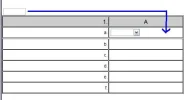
 
Er staat een random <tr> in je code; zie regel 14. Die hoort daar toch helemaal niet?!
HTML:
<table cellspacing="1" style="width: 548; position: static;" class="style22">

   <tr>
      <td class="style20" style="width: 1288; height: 30px;">1. </td>
      <td class="style18" style="width: 636; height: 30px;">A</td>
   </tr>
   <tr>
      <td class="style21" style="width: 1288">a. </td>
      <td style="width: 636" class="style22">
         <select name="werkplek0" id="werkplek0" style="width: 87px; z-index: 1; position: static; top: 400px; left 409px;" class="style15">
            <option value="">
            <option value="1">1
            <option value="2">2
            <option value="3">3
<!-- error: deze is een beetje vreemd -->
            <tr>

         </select>
         <input name="bedrijfsnaam11" type="text" id="bedrijfsnaam11" value="<% Response.Write (Bedrijfsnaam) %>" style="width: 67px; z-index: 1; position: static; top: 211px; left: 409px;" class="style15">
      </td>
   </tr>
also, het is een stuk handiger als je met een stylesheet-bestand werkt ipv. losse CSS in de HTML. Want dan wordt alles zo onoverzichtelijk.
 
Dank je. Hoe kan ik dit in een CSS doen?
 
In de <head> van je pagina zet je dit:
HTML:
<link rel='stylesheet' href='stijl.css' />
en je maakt een bestand genaamd stijl.css aan. Zet het 'naast' je pagina (in dezelfde map). stijl.css ziet er ongeveer zo uit:
Code:
.style22
{
   width: 548px;
   position: static;
   border-spacing: 1px;   /* cellspacing */
}

.style20
{
   width: 1288px;
}

.style18
{
   width: 636;
}

.style20, .style18
{
   height: 30px;
}
dit dekt de 1e 5 regels van je HTML. Deze worden dan:
HTML:
<table class="style22">
 
   <tr>
      <td class="style20">1.</td>
      <td class="style18">A</td>
   </tr>

Nog een voorbeeld: je <input> wordt dit:
HTML:
<input name='bedrijfsnaam11' type='text' id='bedrijfsnaam11' class='stijle15' value='<% Response.Write (Bedrijfsnaam) %>' />
en als css:
Code:
#bedrijfsnaam11
{
   width: 67px;
   position: static;
   top: 211px;
   left: 409px;
   z-index: 1;
}
Overgens is deze code eigenlijk overbodig, want position: static en z-index: 1 zijn standaard. Daarnaast werken left en top niet als je geen absolute positionering gebruikt.


Ik weet niet precies waarom er ook overal style="" staat, maar ik neem aan dat je dit met een editor hebt gemaakt? In dat geval is het mischien makkelijker om gewoon met je editor te blijven werken. Maar het is zeker aan te raden om CSS en HTML met de hand te schrijven :)


:thumb:
 
Laatst bewerkt:
Dank je voor de info. Ik werk inderdaad met een editor, maar ook met kladblok. De editor wijst me enigzins de weg en ik probeer het af te maken met kladblok.
 
Status
Niet open voor verdere reacties.
Terug
Bovenaan Onderaan