
Installeer de app
Hoe de app op iOS te installeren
Bekijk de onderstaande video om te zien hoe je onze site als een web app op je startscherm installeert.
Opmerking: Deze functie is mogelijk niet beschikbaar in sommige browsers.
Je gebruikt een verouderde webbrowser. Het kan mogelijk deze of andere websites niet correct weergeven.
Het is raadzaam om je webbrowser te upgraden of een browser zoals Microsoft Edge of Google Chrome te gebruiken.
Het is raadzaam om je webbrowser te upgraden of een browser zoals Microsoft Edge of Google Chrome te gebruiken.
Start menu aanpassen van windows 11 naar 10
- Onderwerp starter gonny64
- Startdatum

edmoor
Inventaris
- Lid geworden
- 8 sep 2000
- Berichten
- 43.346
- Besturingssysteem
- Windows 98SE, XP, 7, 10 LTSC, 11-26H2, Zorin OS 18.1
- Office versie
- Office 2021
Dat kan met een register aanpassing.
Maak wel eerst een backup van het register.
Maak wel eerst een backup van het register.
- Press Windows + R keys to open the Run dialog box. Type regedit and press Enter to open the Registry Editor.
- Navigate to the following key: HKEY_CURRENT_USER\Software\Microsoft\Windows\CurrentVersion\Explorer\Advanced
- Right-click on an empty space in the right pane and select New > DWORD (32-bit) Value. Name the new value Start_ShowClassicMode.
- Double-click on the Start_ShowClassicMode value and change its data to 1. Click OK to save the change.
- Restart your computer or sign out and sign back in to apply the change. You should now see the Windows 10 start menu in Windows 11.
Senso
Inventaris
- Lid geworden
- 13 jun 2016
- Berichten
- 12.205
- Besturingssysteem
- W11 Pro 25H2
- Office versie
- Office 2007 H&S en Office 2021 Prof Plus
Of het kan, is dat niet afhankelijk van de versie? Ik lees dat sinds 22H2 een registertweak niet mogelijk is. Winaero verwijst naar ExplorerPatcher.Niet makkelijker dan wat in #3 staat en echt moeilijk is dat niet.
Senso
Inventaris
- Lid geworden
- 13 jun 2016
- Berichten
- 12.205
- Besturingssysteem
- W11 Pro 25H2
- Office versie
- Office 2007 H&S en Office 2021 Prof Plus
Als je op zoek bent naar de authentieke, klassieke Windows 10/7-stijl, zul je moeten vertrouwen op betrouwbare, lichtgewicht applicaties van derden.
ExplorerPatcher: Dit is de populairste open-source tool voor gevorderde gebruikers. Het wijzigt de taakbalk, het systeemvak en het Startmenu van Windows 11, waardoor je naadloos kunt overschakelen naar het volledige scherm of de compacte Windows 10 Startmenu-weergave.
Bron: Internet
ExplorerPatcher: Dit is de populairste open-source tool voor gevorderde gebruikers. Het wijzigt de taakbalk, het systeemvak en het Startmenu van Windows 11, waardoor je naadloos kunt overschakelen naar het volledige scherm of de compacte Windows 10 Startmenu-weergave.
Bron: Internet

OctaFish
Verenigingslid
- Lid geworden
- 6 feb 2009
- Berichten
- 44.041
- Besturingssysteem
- Windows 10/MacOS
- Office versie
- Office 365
Geen idee waarom je er ineens vanuit gaat dat iedereen liever Engels spreekt, maar goed: het antwoord is simpel. Kijk eens naar het appje van Stardock. Werkt perfect.Is there also an easy way
edmoor
Inventaris
- Lid geworden
- 8 sep 2000
- Berichten
- 43.346
- Besturingssysteem
- Windows 98SE, XP, 7, 10 LTSC, 11-26H2, Zorin OS 18.1
- Office versie
- Office 2021
Ik denk dat je Start11 van Stardock bedoelt?

Stardock Start11: Restore the Classic Start Menu in Windows 10 and 11.
Start11: The ultimate Start menu replacement for Windows 10 and 11. Restore the classic look and add new functionality.
www.stardock.com

srpchulp
Verenigingslid
- Lid geworden
- 16 jun 2009
- Berichten
- 4.855
Dat kan eenvoudig met Winaero tweaker: https://winaerotweaker.com/
Lange Pier
Inventaris
- Lid geworden
- 30 dec 2005
- Berichten
- 32.020
Of gewoon leren om er mee om te gaan.

 www.seniorweb.nl
Zijn allemaal schilletjes, de de echte opdrachten oproepen.
Online cursus: Werken met een Windows 11-computer
Nog geen ervaring met Windows 11? Leer apps installeren, werken met de Verkenner en Edge en leer over onderhoud en veiligheid.
Zijn allemaal schilletjes, de de echte opdrachten oproepen.

Senso
Inventaris
- Lid geworden
- 13 jun 2016
- Berichten
- 12.205
- Besturingssysteem
- W11 Pro 25H2
- Office versie
- Office 2007 H&S en Office 2021 Prof Plus
Dat kan eenvoudig met Winaero tweaker: https://winaerotweaker.com/
Heb jij post 6 niet gelezen! Als het wel kan met Winaero, kom dan met bewijs.

- Lid geworden
- 13 aug 2013
- Berichten
- 5.870
- Besturingssysteem
- Windows 11
- Office versie
- 2024 Pro Plus
Ik snap van het het hele startmenu niets.
Wat snap je niet?
Ik vind Start (niet Startmenu) vrij logisch verdeeld in 5 delen.
- het zoekvak : typ een paar letters en je vindt het.
- vastgemaakte snelkoppelingen : kan je zelf aanpassen.
- recente bestanden die vaker zijn gebruikt.
- het programmamenu.
- Accountinstellingen en Aan/uit menu
En met de rechter muisknop op Start geeft nog steeds een hoop extra.
Bericht automatisch samengevoegd:
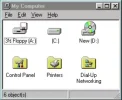
Als er niets verandert zaten we nog steeds naar dit te kijken

Laatst bewerkt:
OctaFish
Verenigingslid
- Lid geworden
- 6 feb 2009
- Berichten
- 44.041
- Besturingssysteem
- Windows 10/MacOS
- Office versie
- Office 365
Als je op mijn linkje had geklikt, had je het geweten. Die gaat gelijk (ook ed klikt niet op mijn tips) naar de juiste pagina.Waar staat stardock
Wat snap je niet?
Ik vind Start (niet Startmenu) vrij logisch verdeeld in 5 delen.
Bij punt 2. Veel mensen hadden 25 snelkoppelingen op het bureaublad, die kunnen nu in Start.
- het zoekvak : typ een paar letters en je vindt het.
- vastgemaakte snelkoppelingen : kan je zelf aanpassen.
- recente bestanden die vaker zijn gebruikt.
- het programmamenu.
- Accountinstellingen en Aan/uit menu
En met de rechter muisknop op Start geeft nog steeds een hoop extra.
Bericht automatisch samengevoegd:
Als er niets verandert zaten we nog steeds naar dit te
Bericht automatisch samengevoegd:
Lees mijn naam +1
OctaFish
Verenigingslid
- Lid geworden
- 6 feb 2009
- Berichten
- 44.041
- Besturingssysteem
- Windows 10/MacOS
- Office versie
- Office 365
Lijkt mij niets met leeftijd te maken te hebben. Tenzij je brein door omstandigheden een enorme tik heeft gehad. Maar ook dan geldt: heeft weinig met leeftijd te maken.Lees mijn naam +1
Het startmenu was op een gegeven moment (vele Windows versies geleden) prima te gebruiken. En is er, dank zij de (blijkbaar onvermijdelijke) noodzaak om in een nieuwe versie iets te moeten veranderen er niet beter op geworden. En dat geldt niet alleen voor het startmenu.
srpchulp
Verenigingslid
- Lid geworden
- 16 jun 2009
- Berichten
- 4.855
Helemaal mee eens.Lijkt mij niets met leeftijd te maken te hebben. Tenzij je brein door omstandigheden een enorme tik heeft gehad. Maar ook dan geldt: heeft weinig met leeftijd te maken.
Het startmenu was op een gegeven moment (vele Windows versies geleden) prima te gebruiken. En is er, dank zij de (blijkbaar onvermijdelijke) noodzaak om in een nieuwe versie iets te moeten veranderen er niet beter op geworden. En dat geldt niet alleen voor het startmenu.
Ik snap dat je als softwareleverancier soms functionaliteit van je product wilt toevoegen of veranderen, maar waarom het uiterlijk altijd weer anders moet is mij een raadsel.
Ben je eindelijk gewend aan een bepaald uiterlijk van de software, dan vindt e.e.a. dwaas het weer nodig om dat te veranderen.


